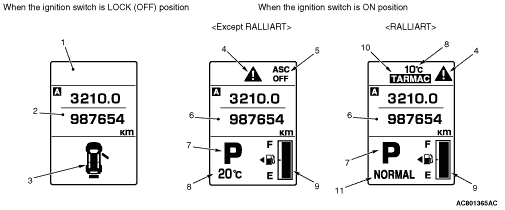
Item
|
Content
|
4
|
Caution mark display screen
|
When warnings are displayed on the information screen, pressing the multi information meter switch turns off the warning display and displays the caution mark. Caution mark is displayed also when two or more alarms occur simultaneously.
|
5
|
ASC OFF display screen
|
Displayed when the ASC system is turned OFF using the ASC OFF switch.
|
6
|
Information screen/interrupt display screen
|
- When the multi information meter switch is operated, the displayed information contents are changed in the following order.
- Odometer/trip meter (A) (To reset the trip meter, press and hold the switch.)
- Odometer/trip meter (B) (To reset the trip meter, press and hold the switch.)
- Service reminder (When service reminder function is enabled.)
- Engine coolant temperature display
- Possible cruising distance display
- Average fuel efficiency, average vehicle speed, instantaneous fuel consumption
- Function setting screen (To display the setting screen, press and hold the switch.)
- Warning screen display (When a warning is present.)
An interrupt display of appropriate contents is performed when a warning is issued.
|
7
|
Selector lever position display screen
|
Displays the selector lever <A/T, CVT> or shift lever <TC-SST> position.
|
8
|
Outside temperature display screen
|
Displays the ambient temperature.
|
9
|
Fuel remaining display screen
|
Displays the remaining fuel amount.
|
10
|
ACD control mode display screen
|
Displays the ACD control mode.
|
11
|
TC-SST control mode display screen
|
Displays the operation status of TC-SST control.
|
Schedule
|
Warning type
|
Warning criteria
|
EU 1 (initial condition) <Except RALLIART>
|
Elapsed time (month)
|
Every 12 elapsed month
|
Driving distance (miles)
|
Every 9,000 miles of driving distance
|
Driving distance (km)
|
Every 15,000 km of driving distance
|
EU 2
|
Elapsed time (month)
|
Every 12 elapsed month
|
Driving distance (miles)
|
Every 12,000 miles of driving distance
|
Driving distance (km)
|
Every 20,000 km of driving distance
|
Optional INT (initial condition)* <RALLIART>
|
Elapsed time (month)
|
Every 6 elapsed month
|
Driving distance (miles)
|
Every 4,500 miles of driving distance
|
Driving distance (km)
|
Every 7,500 km of driving distance
|
OFF Display
|
Without function. "OFF" is displayed on the odometer/tripmeter.
|
Function OFF
|
Without function (Only M.U.T.-III can be set.)
|