SPEAKER TEST
RADIO AND CD PLAYER SPEAKER TEST |
| Enter the speaker test mode according to the following steps: |
| 1.Turn the Ignition switch to the "ACC" or "ON" position and switch off the radio and
CD player. |
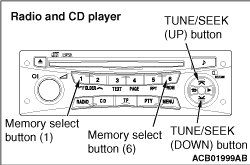 |
2.Press the following buttons in that order within sixty seconds from step (1). (1) Memory select "1" button (2) "TUNE/SEEK (DOWN)" button (3) "TUNE/SEEK (UP)" button (4) Memory select "6" button 3.Check that the speaker, which is displayed on the RV meter, sounds (If the [CH6] button is pressed, the speaker will be changed).
|