Inspection Procedure 2: The USB memory device data cannot be replayed. <Vehicles with MMCS>
| caution | Before replacing the hands free ECU, ensure that the power supply circuit, the earth circuit and the communication circuit are normal. |
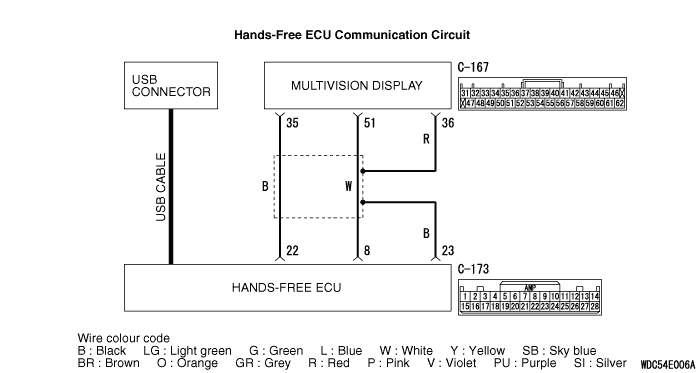
COMMENTS ON TROUBLE SYMPTOM
| note | Before troubleshooting, check that the music file (the customer tried to replay) can be replayed. |
PROBABLE CAUSES
- The multivision display may be defective.
- The hands free ECU may be defective.
- The USB cable may be defective.
- Damaged harness wires and connectors
DIAGNOSIS PROCEDURE |
STEP 1. Check the multivision display operation. |
| Check if the multivision display work normally and the sound is output. |
Q.
Is the check result normal?
|
 Go to Step 2. |
|
 Troubleshoot the MMCS (Refer to  .). |
|
STEP 2. Check the diagnosis mode |
| Check if the hands free ECU can be switched to the diagnosis mode. (Refer to .) |
Q.
Is the check result normal?
|
| Go to Step 3. |
|
| Perform Inspection Procedure 5 "DIAGNOSIS MODE cannot be made an entry." (Refer to .) |
|
STEP 3. Check the USB cable. |
| Check that the USB cable is connected to the hands free ECU normally. Or check the USB cable for damage such as bend. |
Q.
Is the check result normal?
|
| Go to Step 4. |
|
| Replace or repair the USB cable. |
|
STEP 4. Connector check: C-173 hands free ECU connector, C-167 multivision display connector |
Q.
Is the check result normal?
|
| Go to Step 5. |
|
| Repair the defective connector. |
|
STEP 5. Check the wiring harness between C-173 hands free ECU connector terminal No.8, 22, 23 and C-167 multivision display connector terminal No. 51, 35, 36. |
|
Q.
Is the check result normal?
|
| Go to Step 6. |
|
| Repair the wiring harness. |
|
STEP 6. Replace the hands free ECU temporarily, and check the trouble symptom. |
| Replace the hands free ECU temporarily, and check that the sound is output from the speaker. |
Q.
Is the check result normal?
|
| Replace the hands free ECU. |
|
| Replace the multivision display. |
|