|
|
Perform the speaker test, and check which speaker does not output the sound. Refer to  . .
|
|
|
Q.
Is the check result normal?
|
|
|
 The trouble can be an intermittent malfunction (Refer to GROUP 00 - How
to Cope with Intermittent Malfunction ). The trouble can be an intermittent malfunction (Refer to GROUP 00 - How
to Cope with Intermittent Malfunction ).
|
|
|
|
|
|
NO (Either a speaker is abnormal) : Go to Step 2. : Go to Step 2.
|
|
|
|


|
Q.
Is the check result normal?
Go to Step 3.
 Repair the defective connector. Repair the defective connector.
|
|
|
(1)Remove the speaker or tweeter. Refer to .
|
|
|
(2)Check that the speaker or tweeter outputs the noise when the voltage of 5 V is
applied to the speaker or tweeter connector terminal.
|
|
|
Q.
Is the check result normal?
|
|
|
Replace the speaker or tweeter.
|
|
|
|


|
Q.
Is the check result normal?
Go to Step 5.
Repair the defective connector.
|
|
|
Check the communication lines for open circuit and short circuit.
|


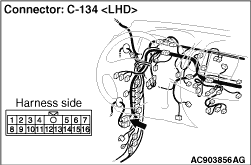
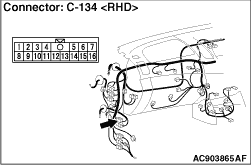
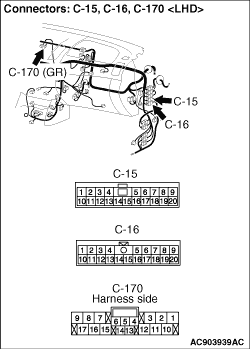


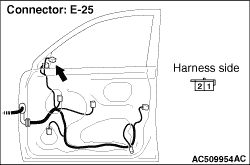


|
- <Front door speaker (LH)> Check the wire harness between E-19 front
door speaker (LH) connector terminal No.1, 2 and C-170 multivision display connector terminal No.8,
18.
| note |
Prior to the wiring harness inspection, check intermediate connectors C-134, C-58 and
C-15, and repair if necessary.
|
- <Tweeter (LH)> Check the wire harness between E-24 tweeter (LH) connector
terminal No.2, 1 and C-170 multivision display connector terminal No.8, 18.
| note |
Prior to the wiring harness inspection, check intermediate connectors C-133, C-16 and
C-15, and repair if necessary.
|
- <Front door speaker (RH)> Check the wire harness between E-11 front
door speaker (RH) connector terminal No.1, 2 and C-170 multivision display connector terminal No.6,
16.
| note |
Prior to the wiring harness inspection, check intermediate connectors C-122, C-58 and
C-15, and repair if necessary.
|
- <Tweeter (RH)> Check the wire harness between E-25 tweeter (RH) connector
terminal No.2, 1 and C-170 multivision display connector terminal No.6, 16.
| note |
Prior to the wiring harness inspection, check intermediate connectors C-121, C-16 and
C-15 and repair if necessary.
|
- <Rear speaker (LH)> Check the wire harness between E-22 rear door speaker
(LH) connector terminal No.1, 2 and C-170 multivision display connector terminal No.7, 17.
| note |
Prior to the wiring harness inspection, check intermediate connectors D-14 and C-59, and
repair if necessary.
|
- <Rear speaker (RH)> Check the wire harness between E-09 rear door speaker
(RH) connector terminal No.1, 2 and C-170 multivision display connector terminal No.5, 15.
| note |
Prior to the wiring harness inspection, check intermediate connectors D-24, C-59 and repair
if necessary.
|
Q.
Is the check result normal?
Go to Step 6.
Repair the wiring harness.
|
|
|
Check if the sound is output from all the speakers.
|
|
|
Q.
Is the check result normal?
|
|
|
The trouble can be an intermittent malfunction (Refer to GROUP 00 - How
to use Troubleshooting/inspection Service Points - How to Cope with Intermittent
Malfunction ).
|
|
|
|
|
|
Temporarily replace the multivision display, and check if the sound is output from all
the speakers.
|
|
|
Q.
Is the check result normal?
|
|
|
Replace the multivision display.
|
|
|
|
|
|
Replace the speaker which does not output the sound.
|
|
|
|
