|
|
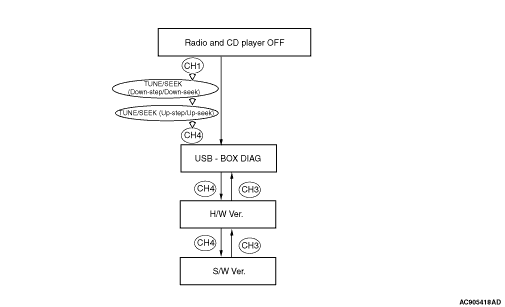
Enter the diagnosis mode according to the following steps:
|
|
|
1.Turn the Ignition switch to the "ACC" or "ON" position and switch off the radio and
CD player.
|
|
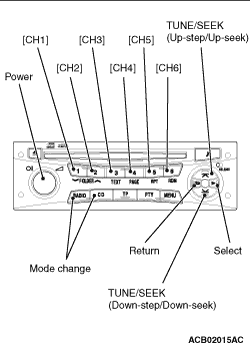
2.Press the following buttons in that order within sixty seconds from step (1).
(1)
[CH1] button.
(2)
TUNE/SEEK (Down-step/Down-seek) button.
(3)
TUNE/SEEK (Up-step/Up-seek) button.
(4)
[CH4] button.
| note |
When the "Power" button of the radio and CD player is pressed during the diagnosis mode,
the diagnosis mode will be cancelled, thus switching off the radio and CD player.
|
3."USB - BOX DIAG" is displayed.
|