|
|
(1)Operate the M.U.T.-III to read the ETACS-ECU option coding information (Refer to
GROUP 00 - Coding List  ). ).
|
|
|
(2)Check that the "Number of speaker" is set to "Premium."
|
|
|
Q.
Is the check result normal?
|
|
|
 Operate the M.U.T.-III to set the option coding "Number of speaker" to "Premium,"
and check the trouble symptom. Operate the M.U.T.-III to set the option coding "Number of speaker" to "Premium,"
and check the trouble symptom.
|
|
|
|
|
|
Q.
Is the check result normal?
|
|
|
Repair the defective connector.
|
|
|
|
|
|
(1)Disconnect the connector, and measure at the wiring harness side.
|
|
|
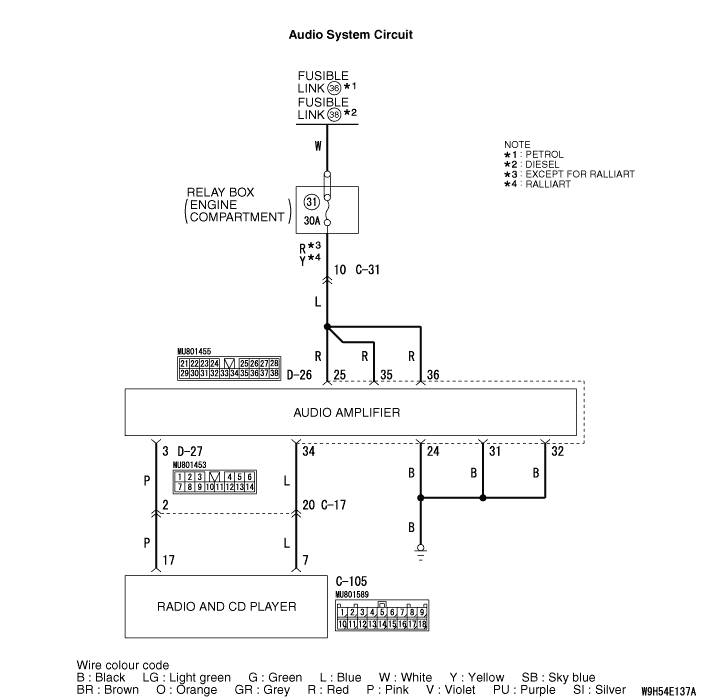
(2)Measure the resistance between D-26 audio amplifier connector terminal No.24 and
the body earth.
OK: Continuity exists (2 Ω or less)
|
|
|
(3)Measure the resistance between D-26 audio amplifier connector terminal No.31 and
the body earth.
OK: Continuity exists (2 Ω or less)
|
|
|
(4)Measure the resistance between D-26 audio amplifier connector terminal No.32 and
the body earth.
OK: Continuity exists (2 Ω or less)
|
|
|
Q.
Is the check result normal?
|
|
|
- Check the earth wires for open circuit.
|
|
|
Q.
Is the check result normal?
|
|
|
 The trouble can be an intermittent malfunction (Refer to GROUP 00 - How
to use Troubleshooting/inspection Service Points - How to Cope with Intermittent
Malfunction ). The trouble can be an intermittent malfunction (Refer to GROUP 00 - How
to use Troubleshooting/inspection Service Points - How to Cope with Intermittent
Malfunction ).
|
|
|
|
|
|
Repair the wiring harness.
|
|
|
|
|
|
(1)Disconnect the connector, and measure at the wiring harness-side connector.
|
|
|
(2)Voltage between D-26 audio amplifier connector terminal No.25 and the body earth
OK: System voltage
|
|
|
(3)Voltage between D-26 audio amplifier connector terminal No.35 and the body earth
OK: System voltage
|
|
|
(4)Voltage between D-26 audio amplifier connector terminal No.36 and the body earth
OK: System voltage
|
|
|
Q.
Is the check result normal?
|
|
|
- Check the power supply line for open circuit or short circuit.
|
|
|
Q.
Is the check result normal?
|
|
|
The trouble can be an intermittent malfunction (Refer to GROUP 00 - How
to use Troubleshooting/inspection Service Points - How to Cope with Intermittent
Malfunction ).
|
|
|
|
|
|
Repair the wiring harness.
|
|
|
|
|
|
Q.
Is the check result normal?
|
|
|
Repair the defective connector.
|
|
|
|
|
|
- Check the communication line for open circuit or short circuit.
|
|
|
Q.
Is the check result normal?
|
|
|
Repair the wiring harness.
|
|
|
|
|
|
Q.
Is the check result normal?
|
|
|
Repair the defective connector.
|
|
|
|
|
|
- Check the communication line for open circuit or short circuit.
|
|
|
Q.
Is the check result normal?
|
|
|
Repair the wiring harness.
|
|
|
|
|
|
Replace the audio amplifier, then check that the audio sound is output.
|
|
|
Q.
Is the check result normal?
|
|
|
The trouble can be an intermittent malfunction (Refer to GROUP 00 - How
to use Troubleshooting/inspection Service Points - How to Cope with Intermittent
Malfunction ).
|
|
|
|
|
|
Replace the radio and CD player.
|
|
|
|