Inspection Procedure 6: The Sound of External Input are not Played.
| caution | Before replacing the radio and CD layer, ensure that the power supply circuit, the earth circuit and the communication circuit are normal. |
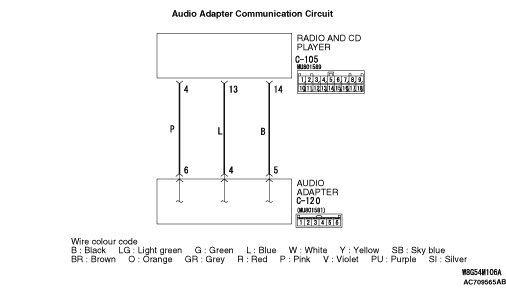


COMMENTS ON TROUBLE SYMPTOM
PROBABLE CAUSES
- The audio adapter may be defective.
- The radio and CD player may be defective.
- Damaged harness wires and connectors
DIAGNOSIS |
STEP 1. Check the radio and CD player operation. |
| Check if the radio and CD player work normally and the sound is output. |
Q.
Is the check result normal?
|
 Go to Step 2. Go to Step 2. |
|
 Troubleshoot the radio and CD player (Refer to Troubleshoot the radio and CD player (Refer to  ). ). |
|
Step 2. Check the external sounds input mode. |
| Check if the radio and CD player is switched to the external sounds input mode. |
Q.
Is the check result normal?
|
| Go to Step 3. |
|
| Switch to the external sounds input mode. |
|
STEP 3. Check the audio adapter. |
| Check if the audio adapter works normally.(Refer to ) |
Q.
Is the check result normal?
|
| Go to Step 4. |
|
| Replace the Audio adapter. |
|
STEP 4. Connector check: C-120 audio adapter connector and C-105 radio and CD player connector |
Q.
Is the check result normal?
|
| Go to Step 5. |
|
| Repair the defective connector. |
|
STEP 5. Check the wiring harness between C-120 audio adapter connector terminal No. 5, 4, 6 and C-105 radio and CD player connector terminal No. 14, 13, 4. |
|
Q.
Is the check result normal?
|
| Replace the audio adapter, then go to Step 6. |
|
| Repair the wiring harness. |
|
STEP 6. Check of the troubles |
| Check that the external input is normal. |
Q.
Is the check result normal?
|
| The trouble can be an intermittent malfunction (Refer to GROUP 00 - How to use Troubleshooting/inspection Service Points - How to Cope with Intermittent Malfunction ). |
|
| Replace the radio and CD player. |
|