|
|
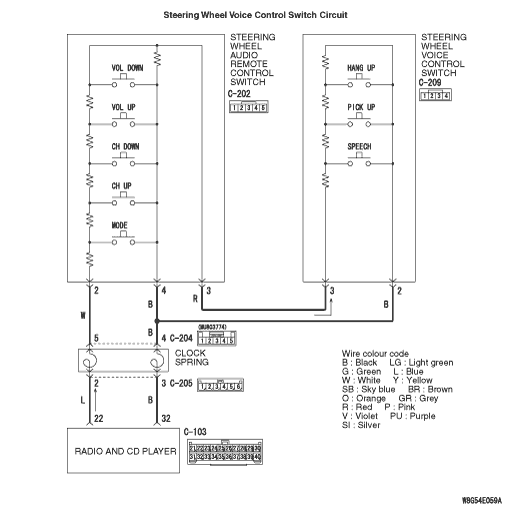
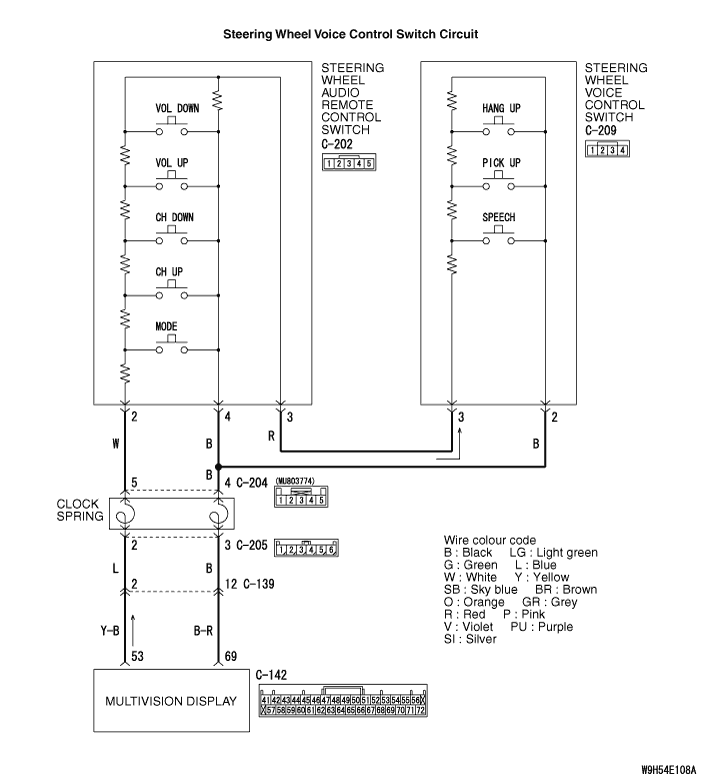
Check that the radio and CD player <vehicles without MMCS> or multivision display <vehicles with MMCS> works normally.
|
|
|
Q.
Is the check result normal?
|
|
|
 Diagnose the radio and CD player <vehicles without MMCS> or multivision display <vehicles with MMCS> (Refer to Radio and CD player - Diagnosis Diagnose the radio and CD player <vehicles without MMCS> or multivision display <vehicles with MMCS> (Refer to Radio and CD player - Diagnosis  <vehicles without MMCS> or MMCS - Diagnosis <vehicles with MMCS>). <vehicles without MMCS> or MMCS - Diagnosis <vehicles with MMCS>).
|
|
|
|
|
|
Check that the radio and CD player <vehicles without MMCS> or multivision display <vehicles with MMCS> can be operated normally using the steering wheel audio remote control switch.
|
|
|
Q.
Is the check result normal?
|
|
|
Diagnose the steering wheel audio remote control switch (Refer to <vehicles without MMCS> or <vehicles with MMCS>).
|
|
|
|
|
|
Use the M.U.T.-III to diagnose the CAN bus lines.
|
|
|
Q.
Is the check result normal?
|
|
|
Check the diagnosis code is set to the radio and CD player <vehicles without MMCS> or multivision display <vehicles with MMCS>.
|
|
|
Q.
Is the diagnosis code set?
|
|
|
 Diagnose the radio and CD player <vehicles without MMCS> or multivision display <vehicles with MMCS> (Refer to Radio and CD player - Diagnosis <vehicles without MMCS> or MMCS - Diagnosis <vehicles with MMCS>). Diagnose the radio and CD player <vehicles without MMCS> or multivision display <vehicles with MMCS> (Refer to Radio and CD player - Diagnosis <vehicles without MMCS> or MMCS - Diagnosis <vehicles with MMCS>).
|
|
|
|
|
|
Q.
Is the check result normal?
|
|
|
Replace the steering wheel voice control switch.
|
|
|
|
|
|
Q.
Is the check result normal?
|
|
|
Replace the steering wheel audio remote control switch.
|
|
|
|
|
|
Q.
Is the check result normal?
|
|
|
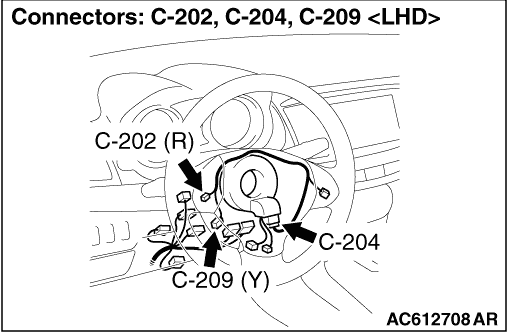
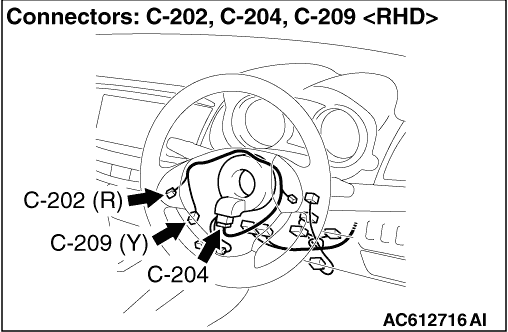
Repair the defective connector.
|
|
|
|
|
|
- Check the communication lines for open circuit and short circuit.
|
|
|
Q.
Is the check result normal?
|
|
|
Repair the wiring harness.
|
|
|
|
|
|
- Check the communication lines for open circuit and short circuit.
|
|
|
Q.
Is the check result normal?
|
|
|
Repair the wiring harness.
|
|
|
|
|
|
Check again if the diagnosis code is set to the hands free-ECU.
|
|
|
(1)Erase the diagnosis code.
|
|
|
(2)Turn the ignition switch from "LOCK" (OFF) position to "ON" position.
|
|
|
(3)Check if diagnosis code is set.
|
|
|
Q.
Is the diagnosis code set?
|
|
|
The procedure is complete.
|
|
|
|
|
|
Check again if the diagnosis code is set to the hands free-ECU.
|
|
|
(1)Erase the diagnosis code.
|
|
|
(2)Turn the ignition switch from "LOCK" (OFF) position to "ON" position.
|
|
|
(3)Check if diagnosis code is set.
|
|
|
Q.
Is the check result normal?
|
|
|
Replace the hands free-ECU.
|
|
|
|
|
|
Replace the radio and CD player <vehicles without MMCS> or multivision display <vehicles with MMCS>.
|
|
|
|