|
|
(1)Operate the M.U.T.-III to read the ETACS-ECU option coding information (Refer to
GROUP 00 - Coding Table  ). ).
|
|
|
(2)Check that the "Number of speaker" is set to "Premium."
|
|
|
Q.
Is the check result normal?
|
|
|
 Operate the M.U.T.-III to set the option coding "Number of speaker" to "Premium,"
and check the trouble symptom. Operate the M.U.T.-III to set the option coding "Number of speaker" to "Premium,"
and check the trouble symptom.
|
|
|
|
|
|
(1)Display the CAN communication confirmation and coding data for the MMCS service
mode. (Refer to )
|
|
|
(2)Check if "PREMIUM" is displayed.
|
|
|
Q.
Is the check result normal?
|
|
|
Display the service data log for the MMCS service mode and check if the service data log
for the SP (speaker) is displayed. (Refer to .)
|
|
|
Q.
Is the service data log for the SP (speaker) displayed?
|
|
|
Use the M.U.T.-III to diagnose the CAN bus lines.
|
|
|
Q.
Is the check result normal?
|
|
|
Check if the diagnosis code is set to the CAN box unit.
|
|
|
(1)Erase the diagnosis code.
|
|
|
(2)Turn the ignition switch from "LOCK" (OFF) position to "ON" position.
|
|
|
(3)Check if diagnosis code is set.
|
|
|
Q.
Is the diagnosis code set?
|
|
|
 Troubleshoot the MMCS (Refer to ). Troubleshoot the MMCS (Refer to ).
|
|
|
|
|
|
Check if the diagnosis code is set to the ETACS-ECU.
|
|
|
Q.
Is the diagnosis code set?
|
|
|
Diagnose the ETACS-ECU (Refer to GROUP 54A - ETACS-ECU - Troubleshooting ).
|
|
|
|
|
|
Perform the audio speaker check, and check which speaker does not output the sound (Refer
to ).
|
|
|
Q.
Is the check result normal?
|
|
|
YES (normal for all) : The trouble can be an intermittent malfunction (Refer to GROUP 00 - How
to use Troubleshooting/inspection Service Points - How to Cope with Intermittent
Malfunction ).
|
|
|
|
|
|
NO (Either a speaker, a tweeter or a subwoofer is abnormal) : Go to Step 8. : Go to Step 8.
|
|
|
|
|
|
Q.
Is the check result normal?
|
|
|
Repair the defective connector.
|
|
|
|
|
|
(1)Remove the speaker, tweeter or subwoofer. Refer to .
|
|
|
(2)Check that the speaker or tweeter outputs the noise when the voltage of 5 V is
applied to the speaker or tweeter connector terminal. <speaker or tweeter>
|
|
|
(3)Check that the subwoofer outputs the noise when the voltage of 5 V is applied to
the subwoofer connector terminal. <subwoofer>
|
|
|
Q.
Is the check result normal?
|
|
|
Replace the speaker, tweeter or subwoofer.
|
|
|
|
|
|
Q.
Is the check result normal?
|
|
|
Repair the defective connector.
|
|
|
|
|
|
Check the communication lines for open circuit or short circuit.
|
|
|
- <Front door speaker (LH)> Check the wire harness between
E-12 front door speaker (LH) connector terminal No.1, 2 and D-26 audio amplifier connector terminal
No.28, 38.
| note |
Prior to the wiring harness inspection, check intermediate connectors C-17 and C-125,
and repair if necessary.
|
- <Front door speaker (RH)> Check the wire harness between E-10
front door speaker (RH) connector terminal No.1, 2 and D-26 audio amplifier connector terminal
No.27, 37.
| note |
Prior to the wiring harness inspection, check intermediate connectors C-17 and C-111,
and repair if necessary.
|
- <Rear door speaker (LH)> Check the wire harness between E-22 rear
door speaker (LH) connector terminal No.1, 2 and D-27 audio amplifier connector terminal No.1, 7.
| note |
Prior to the wiring harness inspection, check intermediate connector D-21, and repair
if necessary.
|
- <Rear door speaker (RH)> Check the wire harness between E-21 rear
door speaker (RH) connector terminal No.1, 2 and D-27 audio amplifier connector terminal No.2, 8.
| note |
Prior to the wiring harness inspection, check intermediate connector D-01, and repair
if necessary.
|
- <Tweeter (LH)> Check the wire harness between E-02 tweeter (LH)
connector terminal No.1, 2 and D-27 audio amplifier connector terminal No.14, 6.
| note |
Prior to the wiring harness inspection, check intermediate connectors C-17 and C-126,
and repair if necessary.
|
- <Tweeter (RH)> Check the wire harness between E-04 tweeter (RH)
connector terminal No.1, 2 and D-27 audio amplifier connector terminal No.13, 5.
| note |
Prior to the wiring harness inspection, check intermediate connectors C-17 and C-112,
and repair if necessary.
|
- <Subwoofer> Check the wire harness between F-25 subwoofer connector
terminal No.1, 2, 3, 4 and D-26 audio amplifier connector terminal No.30, 22, 29, 21.
| note |
Prior to the wiring harness inspection, check intermediate connector D-17, and repair
if necessary.
|
|
|
|
Q.
Is the check result normal?
|
|
|
YES <front door speaker> : Go to Step 12.
|
|
|
|
|
|
YES <except front door speaker> : Go to Step 14.
|
|
|
|
|
|
NO (harness wire is abnormal) : Repair the wiring harness.
|
|
|
|
|
|
Q.
Is the check result normal?
|
|
|
Repair the defective connector.
|
|
|
|
|
|
- Check the communication lines for open circuit or short circuit.
|
|
|
Q.
Is the check result normal?
|
|
|
Check the trouble symptom, go to Step 14.
|
|
|
|
|
|
Repair the wiring harness.
|
|
|
|
|
|
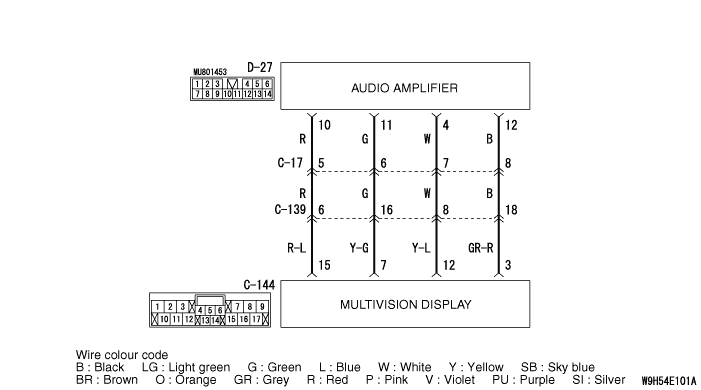
Replace the multivision display temporarily, and check that the sound is output from the
speaker.
|
|
|
Q.
Is the check result normal?
|
|
|
Replace the multivision display.
|
|
|
|
|
|
Replace the audio amplifier..
|
|
|
|