|
|
Enter the speaker connection check mode according to the following steps:
|
|
1.Turn the Ignition switch to the "ACC" or "ON" position and switch off the radio and
CD player.
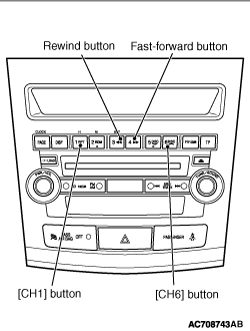
2.Press the following buttons in that order within sixty seconds from step (1).
(1)
[CH1] button
(2)
Rewind button
(3)
Fast-forward button
(4)
[CH6] button
|
|
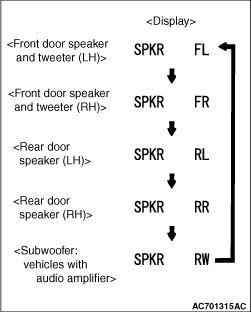
3.Check that the speaker, which is displayed on the centre panel display, sounds (If the [CH6] button
is pressed, the speaker will be changed).
| note |
The display of "FL", "FR", "RL", "RR","RW"blinks.
|
4.If a button other than the [CH6] button is pressed, or the ignition
switch is turned to "LOCK" (OFF) position, you will exit from the speaker connection check mode.
|
|
|
Inserting a CD during the speaker connection check mode shifts the mode to the buzz noise
check mode, and the buzz noise sound of each speaker can be checked.
|
|
|
As with the speaker connection check mode, press the [CH6] button to
switch the output speaker of the buzz noise check sound.
|
|
|
Check that the buzz noise sound is output from the output speaker of buzz noise check
sound.
|