|
|
Enter the speaker connection check mode according to the following steps:
|
|
|
1.Turn the Ignition switch to the "ACC" or "ON" position and switch off the radio and
CD player or CD changer.
|
|
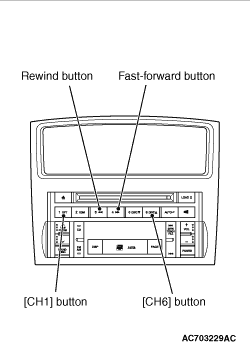
2.Press the following buttons in that order within sixty seconds from step (1).
(1)
[CH1]
button.
(2)
Rewind button.
(3)
Fast-forward button.
(4)
[CH6]
button.
|
|
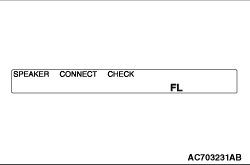
3.Check that the speaker, which is displayed on the centre display unit, sounds (If the [CH6]
button
is pressed, the speaker will be changed).
Display
|
Sound speaker
|
FL
|
Front door speaker (LH) and front tweeter (LH)
|
FR
|
Front door speaker (RH) and front tweeter (RH)
|
RL
|
Rear door speaker (LH) <Long wheelbase>
or rear
speaker <short wheelbase>
,and rear tweeter (LH)
|
RR
|
Rear door speaker (RH) <Long wheelbase>
or rear
speaker <short wheelbase>
,and rear tweeter (RH)
|
WOOFER
|
Subwoofer
|
CENTRE
|
Front speaker
|
RG/L
|
Back door speaker (LH)
|
RG/R
|
Back door speaker (RH)
|
4.If a button other than the [CH6]
button is pressed, or the ignition
switch is turned to "LOCK" (OFF) position, you will exit from the speaker connection check mode.
|
|
|
Inserting a CD during the speaker connection check mode shifts the mode to the buzz noise
check mode, and the buzz noise sound of each speaker can be checked.
|
|
|
As with the speaker connection check mode, press the [CH6]
button to
switch the output speaker of the buzz noise check sound.
|
|
|
Check that the buzz noise sound is output from the output speaker of buzz noise check
sound.
|