|
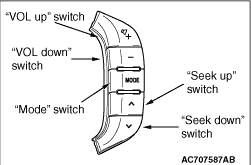
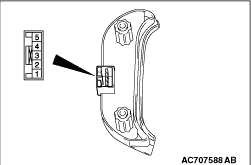
Remove the steering wheel audio remote control switch. Then check continuity
between the switch terminals.
|
|
Switch Position
|
Tester Connection
|
Measurement Value
|
No push
|
2 - 3
|
Approximately 3.1 kΩ
|
1 - 3
|
Approximately 71 kΩ
|
Mode
|
Approximately 270 Ω
|
CH up
|
Approximately 740 Ω
|
CH down
|
Approximately 1.3 kΩ
|
VOL up
|
Approximately 2.1 kΩ
|
VOL down
|
Approximately 3.1 kΩ
|
|
Q.
Is the check result normal?
 Go to Step 2. Go to Step 2.
 Replace the steering wheel audio remote control switch. Replace the steering wheel audio remote control switch.
|
|
|
Q.
Is the check result normal?
|
|
|
Repair or replace the damaged component(s).
|
|
|
|
|
|
Check whether the clock spring is in good condition. Refer to GROUP 52B - Air
bag module and clock spring  . .
|
|
|
Q.
Is the check result normal?
|
|
|
Replace the clock spring.
|
|
|
|
|
|
Q.
Is the check result normal?
|
|
|
Repair or replace the damaged component(s).
|
|
|
|
|
|
- Check the communication lines for open circuit and short circuit.
|
|
|
Q.
Is the check result normal?
|
|
|
Repair the wiring harness.
|
|
|
|
|
|
Q.
Is the check result normal?
|
|
|
Repair or replace the damaged component(s).
|
|
|
|
|
|
- Check the communication lines for open circuit and short circuit.
|
|
|
Q.
Is the check result normal?
|
|
|
Repair the wiring harness.
|
|
|
|
|
|
Check whether you can operate the multivision display by using the steering wheel audio
remote control switch.
|
|
|
Q.
Is the check result normal?
|
|
|
The trouble can be an intermittent malfunction (Refer to GROUP 00 - How
to use Troubleshooting/inspection Service Points, How to Cope with Intermittent Malfunction ).
|
|
|
|
|
|
Replace the multivision display.
|
|
|
|