|
|
Check if the radio and CD player or CD changer work normally and the sound is output.
|
|
|
Q.
Is the check result normal?
|
|
|
 Troubleshoot the radio and CD player or CD changer (Refer to  ).
|
|
|
|
|
|
Check if the audio unit is switched to the "USB mode".
|
|
|
Q.
Is the check result normal?
|
|
|
Switch to the external sounds input mode.
|
|
|
|
|
|
Check if the audio display is displayed the "LSI ERROR".
|
|
|
Q.
Is the check result normal?
|
|
|
Check if the USB adapter works normally.(Refer to )
|
|
|
Q.
Is the check result normal?
|
|
|
Check that the USB cable is connected to the USB adapter or USB box normally. Or check the USB cable for damage such as bend.
|
|
|
Q.
Is the check result normal?
|
|
|
Replace or repair the USB cable.
|
|
|
|
|
|
Q.
Is the check result normal?
|
|
|
Repair the defective connector.
|
|
|
|
|
|
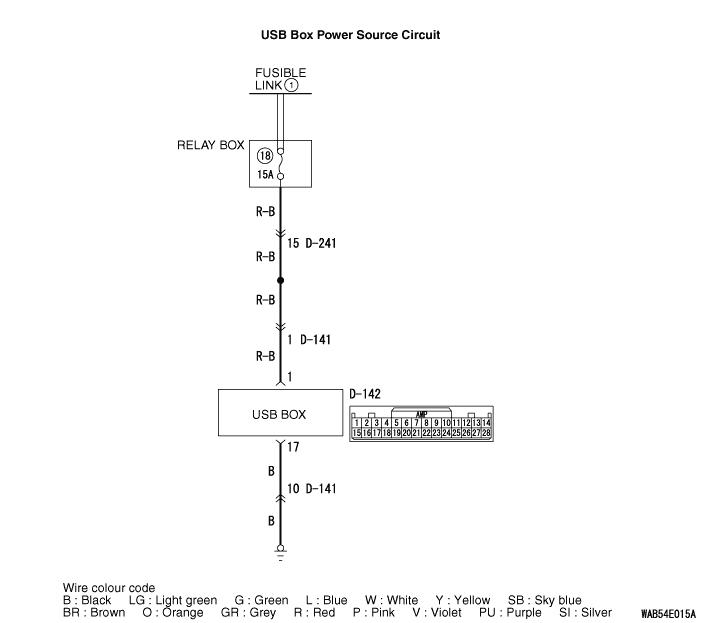
(1)Disconnect the connector, and measure at the wiring harness-side connector.
|
|
|
(2)Voltage between D-46 USB box connector terminal No.1 and the body earth
OK: System voltage
|
|
|
Q.
Is the check result normal?
|
|
|
- Check the power supply lines (battery power supply) for open circuit and short circuit.
|
|
|
Q.
Is the check result normal?
|
|
|
 The trouble can be an intermittent malfunction (Refer to GROUP 00 - How to use Troubleshooting/inspection Service Points - How to Cope with Intermittent Malfunction ).
|
|
|
|
|
|
Repair the wiring harness.
|
|
|
|
|
|
(1)Disconnect D-46 USB box connector, and measure the resistance available at the wiring harness side of the connector.
|
|
|
(2)Check the continuity between terminal No.17 and body earth.
OK: Continuity exists (2 Ω or less)
|
|
|
Q.
Is the check result normal?
|
|
|
- Check the earth wires for open circuit.
|
|
|
Q.
Is the check result normal?
|
|
|
The trouble can be an intermittent malfunction (Refer to GROUP 00 - How to use Troubleshooting/inspection Service Points - How to Cope with Intermittent Malfunction ).
|
|
|
|
|
|
Repair the wiring harness.
|
|
|
|
|
|
Q.
Is the check result normal?
|
|
|
Repair the defective connector.
|
|
|
|
|
|
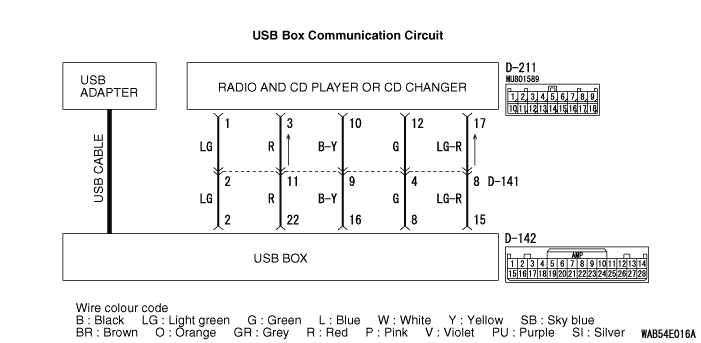
- Check the communication line for open circuit and short circuit.
|
|
|
Q.
Is the check result normal?
|
|
|
Repair the wiring harness.
|
|
|
|
|
|
Replace the USB box temporarily, and check that the sound is output from the speaker.
|
|
|
Q.
Is the check result normal?
|
|
|
Replace the radio and CD player or CD changer.
|
|
|
|