Inspection Procedure 7: GPS Signal can not be Received. <Vehicles for RUSSIA>
| caution | Whenever the ECU is replaced, ensure that the power supply circuit and the earthing circuit are normal. (Check that the voltage is 10 V or more.) |
COMMENTS ON TROUBLE SYMPTOM
PROBABLE CAUSES
- Malfunctions of GPS antenna
- Malfunctions of multivision display
DIAGNOSIS PROCEDURE |
STEP 1. Confirmation in MMCS service mode |
Perform "Network/Connect Line Check" in the MMCS service mode to check that the communication and wire connection with the GPS antenna are OK. (Refer to  .) |
Q.
Is the check result normal?
|
 Go to Step 2. |
|
 Go to Step 4. |
|
STEP 2. Check for the vehicle’s current position. |
| Check that the vehicle is parked on a well-ventilated place. |
Q.
Is the vehicle parked on a well-ventilated place?
|
| Go to Step 3. |
|
| Move the vehicle to a well-ventilated area. |
|
STEP 3. Confirming GPS signal reception |
| (1)Start the multivision display. |
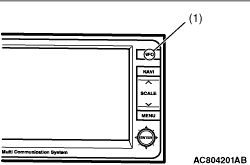 |
(2)Press the (1). |
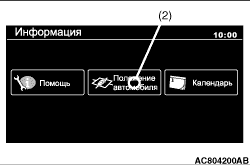 |
(3)Select (2). |
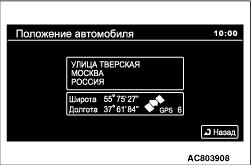 |
(4)Wait for 5 minutes, and then check whether GPS signal can be received.Q.
Can GPS signal be received?The diagnosis is complete. (There is no failure)Go to Step 4. |
STEP 4. Substitute a known good multivision display, and check the trouble symptom. |
| (1)Temporarily replace the multivision display. |
| (2)Start the multivision display. |
|
(3)Press the (1). |
|
(4)Select (2). |
|
(5)Wait for 5 minutes, and then check whether GPS signal can be received.Q.
Is the check result normal?Replace the multivision display.Replace the GPS antenna. |